Claude Code website templates and UI starters
Compare landing-page and dashboard starters, assemble real React components, and tailor a website brief plus CLAUDE.md.
The short answer
Choose a website starter for the page you need to build.
Use a marketing template for a landing page, a SaaS starter for an account-based dashboard, or individual components inside an existing React app. Add a concise CLAUDE.md so Claude understands that codebase.
The practical view
What should a Claude Code website template actually give you?
Working routes, a visible design direction and source you can inspect. Claude Code can work with a normal website repository; it does not require a special Claude-branded theme. A landing-page starter and an application dashboard have different requirements, so choose by product scope and stack before adding agent configuration.
If you searched for a CLAUDE.md template, reusable skills or the Claude Code Templates CLI, go to the six configuration resources below. Those tools guide Claude's work; a source-code starter supplies the website. Anthropic's feature overview explains how project context, skills and plugins fit together.
One important update: custom commands now live under the skills model. Existing .claude/commands/ files still work, but Anthropic recommends skills for new workflows because they can include supporting files and load when relevant.
Source-code starting points
Compare Claude Code website templates by use case
For a new website, shortlist a source repository that fits your framework, pages and data requirements. None of these needs a Claude-specific installer. Open the chosen project in Claude Code, run its documented development command, and map the architecture before adapting the UI.
| Starting point | Website job | Stack and access | What remains |
|---|---|---|---|
| Vercel Templates | Landing pages, portfolios and framework examples | Starter repositories; inspect the chosen stack | Individual publishers set the licence and service requirements. |
| Next.js SaaS Starter | An account-based product with a dashboard | Next.js, Postgres, Drizzle, Stripe and shadcn/ui | A learning foundation with demo assumptions to review, not a finished production app. |
| Tailwind Plus Radiant | A cohesive SaaS marketing website | Paid Tailwind CSS and React website template | Check the current licence and source requirements before purchasing. |
| Astro Themes | Content-led websites, blogs and documentation | Free and paid Astro themes | Review each theme; React components require the appropriate integration. |
| shadcn/ui Blocks | A dashboard or account flow inside an existing React app | Open-source page blocks with editable source | A block supplies a UI pattern; your app supplies data and authorization. |
Public documentation and demos checked on 29 September 2026. These are source and scope comparisons; paid template source was not tested.
Start with the story
Choose a marketing starter with the right visual rhythm. Verify the headline, real product demonstration and primary action before adding effects. A brochure site may not need database or billing setup.
Preview: Tailwind Plus Radiant ↗Start with the flow
Choose a starter with the account and data model you need. Inspect roles, record actions and failure states. If you need Supabase accounts, its official Next.js quickstart is another foundation to review.
Inspect: Supabase Next.js quickstart ↗Extend its UI system
Preserve routing and shared tokens. Give Claude a small selection of components and examples from the app. A design skill can guide the procedure without introducing another application scaffold.
Explore: Rendyn React components ↗A free Claude Code website template may still depend on paid services. Inspect the repository licence, dependency versions and content rights separately. If no visual template fits, begin with a framework scaffold and choose components deliberately rather than adapting a large starter around one attractive screenshot.
Compose the interface
Build a landing page or dashboard from real components
Rendyn supplies React component previews and source access, rather than a complete Claude Code website template. These are suggested compositions inside your chosen starter. Inspect the source, dependencies, attribution and current access terms for each component before bringing it into the project.
A landing page with product evidence
Keep the starter's header, footer and responsive rhythm. Put the primary action beside a clear promise, then use a Bento Grid to explain three specific capabilities. A Hero Video Dialog can open a real product walkthrough; use Marquee only for a justified logo or content strip.
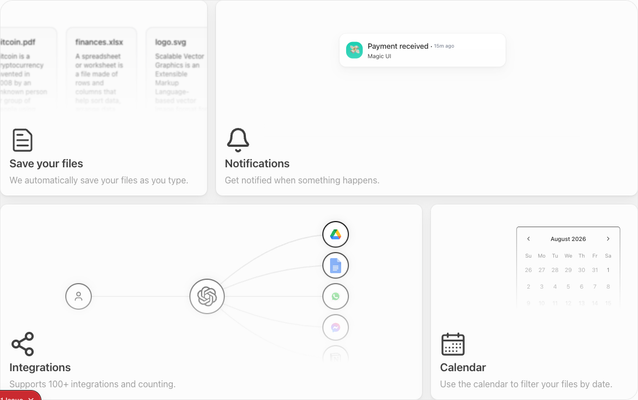
- Give Claude
- Approved product facts, real assets, the CTA destination and a visual reference you have permission to use.
- Verify
- Readable mobile ordering, visible feature links, keyboard focus and reduced-motion behavior. Remove any fabricated testimonials or conversion claims.
A dashboard for tracking and acting on work
Keep the starter's navigation and account boundary. Use the Virtualized Data Table for records and a Command Palette for navigation or actions. Pick Kanban when statuses are central, or Dropzone when users must select files.
- Give Claude
- Your record schema, allowed actions and examples of loading, empty and failed-save states.
- Implement
- Server authorization, persistence and file validation. The components supply interface behavior; your backend remains responsible for the actions.
Anthropic's best-practice guidance recommends giving Claude screenshots or mockups and a way to verify the result. Attach a reference with the product constraints, build one complete flow, then inspect the actual browser result before repeating the pattern across more pages.
For an AI product interface, Prompt Input and Streaming Response are useful adjacent components. They do not provide a model API, streaming transport or an agent backend.
Make the starter specific
A Claude Code website brief you can adapt
Replace the bracketed fields and remove the recipe that does not fit your project. Provide component source through the access route available to you; naming a component in a prompt does not install it. Put durable repository facts in the CLAUDE.md starter below.
Adapt this existing starter into a website for [product] used by [audience].
Primary action: [real destination or user flow].
Pages in scope: [landing page, pricing, dashboard, or named routes].
Use only the supplied product facts and assets; ask when content is missing.
Preserve routing, existing design tokens, account boundaries and validation.

First inspect the project and propose the smallest page composition.
For a marketing page, evaluate Bento Grid and Hero Video Dialog from Rendyn.
For a dashboard, evaluate its Table, Command Palette and Kanban components.
Read the selected component's source, dependencies and attribution before adapting it.
Use only components needed for this flow; do not install every candidate.
Keep placeholders and simulated interactions clearly labelled.

Build loading, empty and error states where relevant.
Check 390px and desktop layouts, keyboard access, focus and reduced motion.
Report the exact routes and interactions verified, plus what still needs backend work.
Do not publish or deploy without approval.
Continue with designing a website with Claude Code for the full build workflow, or improving Claude's design output when your existing UI needs refinement.
At a glance
Six useful picks, each for a different job
| Pick | Best for | Format |
|---|---|---|
| A tailored CLAUDE.md + rules | Established repositories and teams | Markdown |
| Anthropic Agent Skills | Workflows you reuse but do not need always loaded | SKILL.md + optional resources |
| Claude plugin marketplace | Supported integrations and shareable bundles | Versioned plugin |
| Claude Code Templates / aitmpl | Exploring a wide range of configurations | CLI-installed components |
| Awesome Claude Code | Discovery and comparison | Linked directory |
| Web Design skill | Creating or translating visual direction | Claude Code skill |
We rank fit, inspectability and maintainability—not stars, download counters or self-reported “verified” badges.
The taxonomy
What are Claude Code templates?
There is no official .claude/templates/ folder. “Claude templates” is an ecosystem label for several reusable layers. Pick the layer that owns the behaviour you want:
CLAUDE.md + rules
Project context, commands, architecture and conventions. Path-scoped rules keep specialist guidance out of unrelated work.
Skills
Repeatable prompts, checklists, knowledge and multi-step workflows stored in a SKILL.md.
Subagents
Focused workers with their own context and tool access—useful when research or logs would swamp the main conversation.
Hooks + settings
Event-driven scripts and permissions for checks or boundaries that should not depend on model judgement.
MCP configuration
Live access to external systems such as source control, databases, browsers and design tools.
Plugins
Versioned bundles of skills, agents, hooks, MCP servers and related assets that can travel between projects.
Selection criteria
How we chose the shortlist
We read the current Anthropic documentation first, then inspected primary repositories and live discovery surfaces. A resource moved up the list when it was easy to understand before installation and narrow enough to adapt.
- Current fit
Uses modern Claude Code concepts, paths and terminology rather than deprecated conventions.
- Inspectable source
Lets you read the Markdown, JSON and scripts that will influence or execute on your machine.
- Narrow authority
Requests only the tools and permissions its job requires, with clear limits and human checkpoints.
- Adaptability
Encourages project-specific commands, architecture and verification instead of generic persona theatre.
- Maintenance evidence
Has understandable ownership, recent work, documentation and limitations—but no popularity metric substitutes for review.
- Production discipline
For website starters: sensible dependencies, accessibility, responsive behaviour and a real build path.
The reviews
The best resources, in detail
A tailored CLAUDE.md + rules
The right starting point for build commands, architecture, conventions and constraints Claude should know in every session.
- Best fit
- Established repositories and teams
- Why it stands out
- Small, native and easy to review
- Watch for
- Instructions guide behaviour; they do not enforce a hard security boundary.
Anthropic Agent Skills
Official examples and a minimal SKILL.md template for repeatable workflows, reference material and task-specific expertise.
- Best fit
- Workflows you reuse but do not need always loaded
- Why it stands out
- Clear structure and progressive disclosure
- Watch for
- The repository is educational; test examples and check each item’s licence before critical use.
Claude plugin marketplace
Anthropic’s built-in discovery route for installable plugins that can bundle skills, agents, hooks, MCP servers and code intelligence.
- Best fit
- Supported integrations and shareable bundles
- Why it stands out
- Upstream-aligned discovery and updates
- Watch for
- A marketplace listing is not a security guarantee; inspect permissions, hooks, MCP servers and scripts.
Claude Code Templates / aitmpl
A large community catalogue with component-level browsing and installation across agents, skills, hooks, settings, MCPs and commands.
- Best fit
- Exploring a wide range of configurations
- Why it stands out
- Breadth and a consistent discovery path
- Watch for
- Treat the installer and every selected component as third-party code; review before running.
Awesome Claude Code
A curated map of skills, agents, tooling, plugins and configuration projects when you want to survey the ecosystem before choosing.
- Best fit
- Discovery and comparison
- Why it stands out
- Useful coverage without forcing one installer
- Watch for
- Each linked project has separate maintenance, provenance, permissions and licensing.
Web Design skill
A focused, spec-first skill that can turn a brief, URL or screenshot into an editable design specification, code and an audit loop.
- Best fit
- Creating or translating visual direction
- Why it stands out
- Separates design intent from implementation
- Watch for
- Its crawler and image-fetching scripts need review; a design workflow does not supply your application backend.
Copy, then tailor
A lean CLAUDE.md starter
This starter is intentionally short. Replace every bracketed value, remove irrelevant rules and add only conventions Claude repeatedly misses. Never use prompt instructions as the sole protection for secrets or dangerous actions—configure permissions or hooks when a boundary must be enforced.
# Project guide

## Product
- Purpose: [one sentence]
- Users: [primary audience]
- Non-goals: [what this project deliberately does not do]

## Architecture
- App entry: [path]
- Shared UI: [path]
- Data boundary: [path or service]
- Prefer existing patterns before introducing abstractions.

## Commands
- Install: [command]
- Develop: [command]
- Test: [command]
- Build: [command]

## Working agreement
- Validate external input at the system boundary.
- Never read, print, edit or commit secrets or environment files.
- Preserve unrelated working-tree changes.
- Keep changes scoped; explain any necessary expansion first.
- Add focused tests for changed behaviour using existing patterns.
- Report the route or behaviour tested and any remaining uncertainty.

## Definition of done
- Requested behaviour works from the user-facing surface.
- Relevant tests and the production build pass.
- Accessibility and responsive states are checked for UI work.
Make it yours in three passes
Replace placeholders. Real paths and commands beat broad advice.
Delete generic rules. Every always-on line spends attention; keep only project truth.
Promote repeated procedures. Move long workflows into skills and enforced boundaries into permissions or hooks.
Before you install
A five-minute safe adoption check
Templates can influence tool use; hooks, MCP servers and installers can execute code. “Markdown” does not automatically mean harmless.
Read every instruction, executable script, hook and MCP command.
Check requested tools, permission mode, environment access and network destinations.
Inspect dependency and lockfile changes before accepting them.
Pin or review updates for shared plugins; do not rely on popularity counters.
Try third-party configurations in a disposable repository with no secrets first.
Keep human review around destructive, release, payment and production actions.
Questions answered
Claude template FAQ
What is a good Claude Code landing page template?
Choose a small marketing repository with source you can inspect and a visual system that fits your product. Vercel Templates, Tailwind Plus Radiant and Astro Themes are starting points to compare. Real copy, assets, CTA destinations and browser checks matter more than whether the template includes Claude branding.
Which Claude Code template should I use for a dashboard?
Inspect the Next.js SaaS Starter if you need a new account-based application. In an existing React product, use a sidebar or page block and selected data components while preserving your backend. Confirm loading, empty, failed-save and permission states before calling the flow complete.
Does Claude Code have an official templates folder?
No. Current project customisation uses specific locations such as CLAUDE.md, .claude/rules/, .claude/skills/, .claude/agents/, settings and .mcp.json. “Template” is a useful ecosystem label, not a native folder name.
What is the difference between CLAUDE.md and a skill?
CLAUDE.md loads every session and should hold concise project truths. A skill loads on demand or when relevant and is better for procedures, checklists and reference material.
Where should personal and project Claude templates live?
Put shared project configuration in the repository. Personal configuration belongs under ~/.claude/. Use project scope when teammates need the same behaviour, and personal scope for preferences that should follow you between projects.
Are third-party Claude templates safe to install?
Do not assume so. Read the source and inspect scripts, hooks, MCP servers, permissions and dependencies. Test unfamiliar bundles away from secrets and production access.
Can Claude Code build a website from a screenshot?
A screenshot can provide visual context, and Claude Code can help translate it into HTML and CSS. Quality still depends on product context, interaction states, accessibility, responsiveness and browser verification—not visual resemblance alone.
Should I use a Claude website template for an existing app?
Usually not as a wholesale scaffold. Preserve the app’s architecture and give Claude the existing design system, components and constraints. A focused design skill can add a repeatable workflow without creating a competing stack.
Keep reading